
Configuring
You will want to configure webhooks in Stax Bill Admin. Follow the steps below to get your webhooks up and running.
-
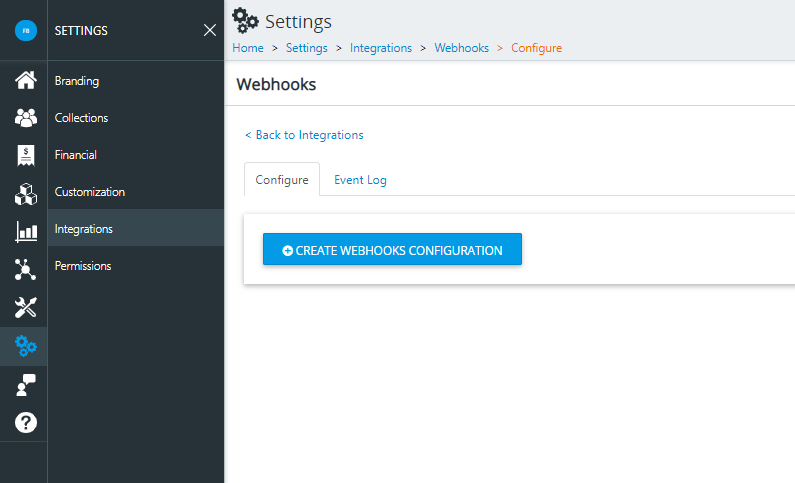
Login to Staxbill Admin, click Settings, click Integrations, click Webhooks.
-
Click Create Webhook Configuration. The configurations screen will open, and from here, you can configure your webhooks.
-
Click Generate Key to create your webhook key. Webhooks are secured using Basic Authentication, and your key is Base64 encoded in the header of every message.
-
Enter a valid URL for us to contact. The URL entered here is where Stax Bill will push the webhooks.
Multiple URLsIt is possible to create multiple webhook configurations, allowing you to route certain events to specified locations as well as multicast.
Common webhook mistakesThe two most common mistakes with webhooks are providing the wrong URL in Stax Bill Admin and the webhook endpoint not returning a
200status code.
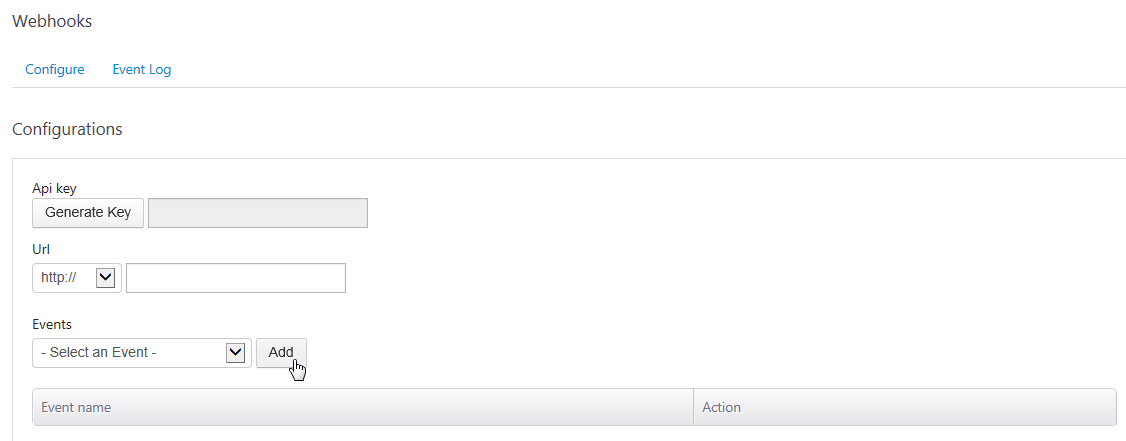
- At this point, you can start adding events.
- Using the drop-down box for Select an Event, click on an event, then click Add.
- The added event will now appear under the Event Name.
- Continue adding events you want to be notified of, and when completed, click Create.
- If there are no issues with your input, you will receive a Success message.
Updated about 1 year ago