
Tracked Quantities
Tracked items are a useful way to relate quantities with unique values. These unique values can be displayed on invoices to your customers or can be used by your agents to manage service. This can accomplish several goals:
-
Tracking which customer/subscription ‘owns’ a specific device by using the device’s serial number as the unique tracked item reference
-
Determining whether the customer who owns a given product license is in good financial status and can therefore access the product by using the license key as the unique reference
-
Determining which item has been purchased and needs to be shipped to the customer by using your own inventory ID as the unique reference
1: Guided Example: The Fitness Bundle Plan
Suppose your company has a website that users pay to access that tracks their fitness data. The user wears a hardware device that measures fitness data and they access statistical information online. In Stax Bill, your company has configured a plan with two products. One is a recurring service for $20 a month which grants access to the website. The other is a physical good costing $250 which is tracking unique quantities
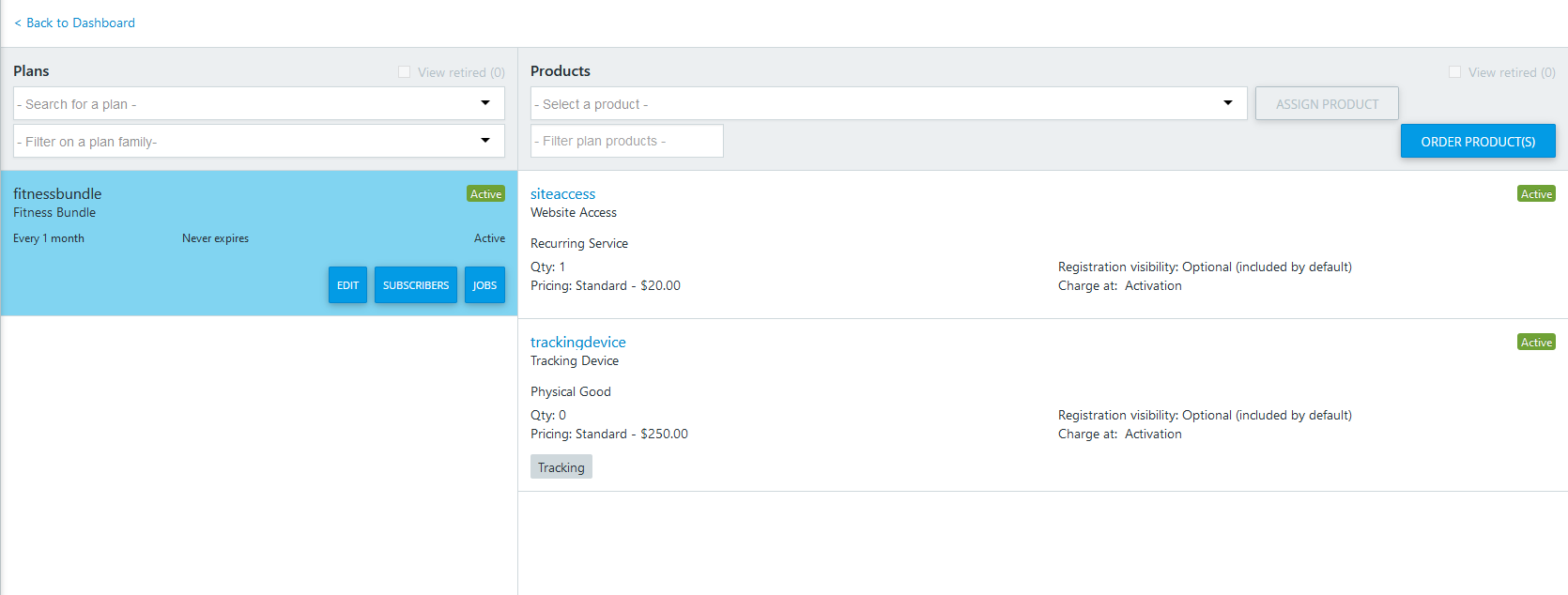
The Fitness Bundle Plan
2: Tracked Item Object Overview
A tracked item has the following fields that you can set:
referenceThis is the 255 character ID that Stax Bill will subject to the following constraints:- The reference is unique among tracked items associated with the Stax Bill ID of a catalog product.
- The reference can be used again only if the previous tracked item (for the catalog product) with that reference is in the ‘Deleted’ status.
nameThis can appear on invoices and is intended to be the name of the product. It is 100 characters long. There are no uniqueness constraints on this value.descriptionThis can also appear on invoices and is intended to be the description for the product. It is 255 characters and has no uniqueness constraints.
The uniqueness constraints in this example mean that no two active fitness tracking devices can share a serial number. This is irrespective of which plan the tracking device was purchased in, or even if the fitness tracking device was purchased outside of the plan/subscription model Stax Bill specializes in.
What follows is how an API integrator could handle basic tracked quantity management
3: Initial Service Signup
If a customer with Stax Bill ID 1234 wants to sign up for the 1 month frequency of the fitness bundle (suppose it has Stax Bill ID 5678), then the first step is a POST call to create the subscription:
POST https://secure.fusebill.com/v1/subscriptions
{
    "customerId": 1234,
    "planFrequencyId": 5678,
    //other values and overrides that can be provided at this point are optional. They are omitted from this example for brevity
}
Check the JSON response to this call and find the Stax Bill generated subscription product ID for the fitness tracking devices. Do this by Iterating through the subscriptionProducts array until the entry with planProduct.productCode equal to “trackingdevice” is found. Copy the id from this element of the array. An integrator would also need the id of the entire subscription.
Now the subscription product items PATCH call can be used to insert a tracked item, whose reference is the serial number of the fitness tracking device the customer has purchased.
PATCH https://secure.fusebill.com/v1/subscriptionproductitems
{
  "subscriptionId": 3000,
  "subscriptionProducts": [
    {
      "subscriptionProductId": 4000,
      "subscriptionProductItems": [
        {
          "name": "Amy's Device",
          "reference": " 46511648516498561554",
          "operation": "Insert",
          "description": "Device Model 75-AB6200 "
        }
      ]
    }
  ]
}
The tracked item PATCH call aims to do multiple actions (updates, inserts, and deletes) against multiple subscription products on the same subscription. In the above example, the call is to update subscription 3000 (a subscription based on the 1-month Fitness Bundle plan). On this subscription, the call only lists one subscription product, ID 4000. This subscription product is a fitness-tracking device. The subscriptionproductItems list is a collection of insert/update/delete actions.
In this case, there is only one action: an insert. A new tracked item is created with the given name, reference, and description. Stax Bill checks the value of reference to see if it violates the tracked item uniqueness constraints. If there are no issues, the tracked item is added.
The draft subscription is activated with the following call:
POST https://secure.fusebill.com/v1/subscriptionActivation/3000Assuming the plan products were set to charge at activation and invoice auto post is turned on, an invoice like the following will be generated:
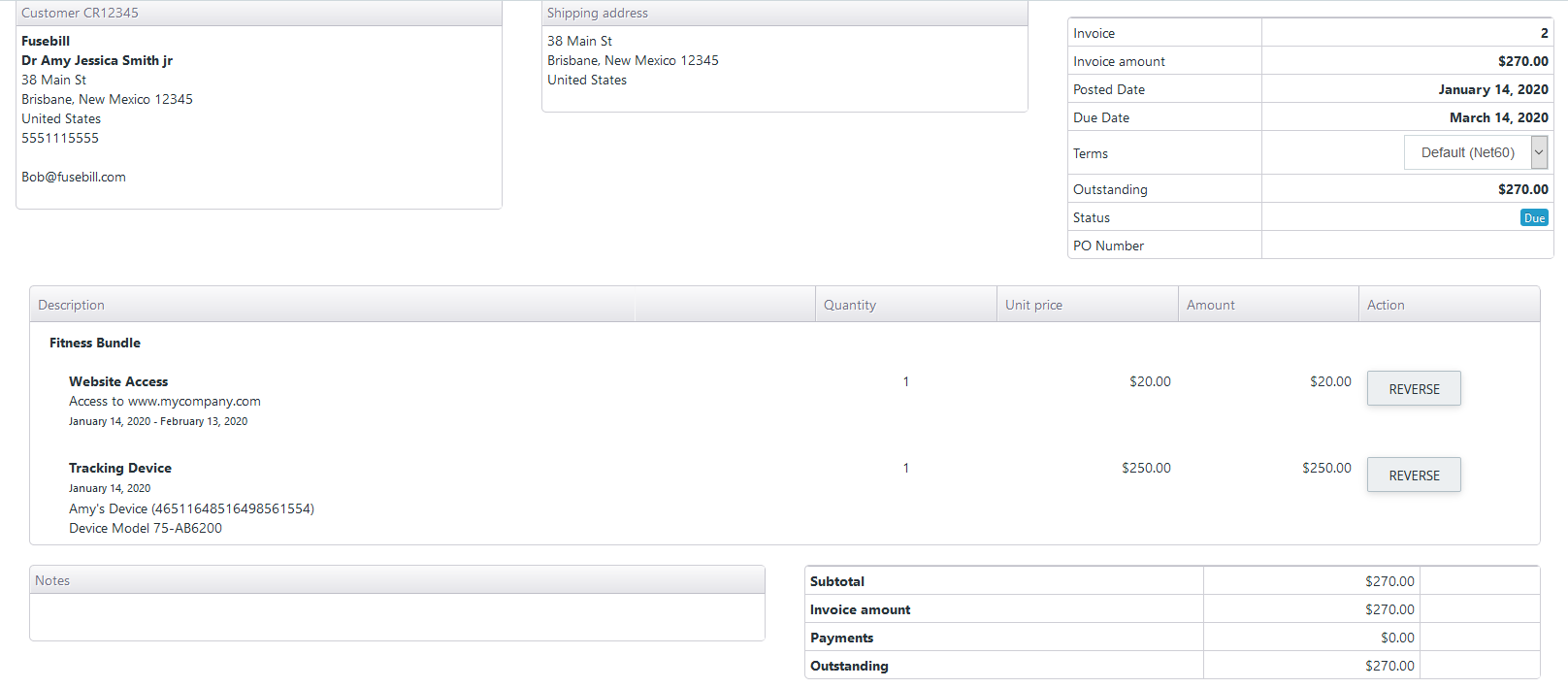
An invoice With Tracked Item Details
4: Additional Tracked Items
Assuming the fitness bundle plan is designed to allow multiple fitness tracking devices, that PATCH call can be used to add multiple new fitness tracking devices as follows:
PATCH https://secure.fusebill.com/v1/subscriptionproductitems
{
  "subscriptionId": 3000,
  "subscriptionProducts": [
    {
      "subscriptionProductId": 4000,
      "subscriptionProductItems": [
        {
          "name": "Bill's Device",
          "reference": "15645895123542564895",
          "operation": "Insert",
          "description": "Device Model 75-AB6200 "
        },
       {
          "name": "Claire's Device",
          "reference": "875162645616842356215",
          "operation": "Insert",
          "description": "Device Model 75-AB6200 "
        }
      ]
    }
  ]
}
Depending on how the Fitness Bundle plan was configured at the time of catalog creation, these 2 new $250 devices could cause an immediate invoice for $500. Alternatively, they could be included on the invoice generated at the time of subscription recharge (which would be for $520).
5: Remove and Modify Tracked Items
Suppose the fitness tracking device with serial 15645895123542564895 was found to be defective. The business has decided to ship them a new device with serial 56543456154895641423. The first thing to do is to find all the related information for the defective tracked item. Assuming the customer ID, subscription ID, and subscription product ID are unknown, it is possible to find the tracked item using the reference. Use string filtering on the list tracked items endpoint:
GET https://secure.fusebill.com/v1/ProductItems?query=reference:15645895123542564895;status:ActiveThis request would return a list containing only one element:
[
  {
    "reference": "15645895123542565000",
    "name": " Bill's Device ",
    "description": "Device Model 75-AB6200 ",
    "subscriptionProductId": 4000,
    "subscriptionId": 3000,
    "customerId": 1234,
    "productId": 2000,
    "status": "Active",
    "createdDate": "2020-01-14T19:00:32",
    "modifiedDate": "2020-01-14T19:00:34.737",
    "id": 5000,
    "uri": "http://secure.fusebill.com/v1/subscriptionProductItems/5000"
  }
]
This gives all the values needed for the upcoming PATCH. Note that it was necessary to filter on status:Active in the query because the uniqueness constraints are only across active tracked items. If there were another product in the catalog which was tracking unique quantities and could potential have a matching value in its reference, then the query could be expanded. This call would guarantee that only one or zero list elements could ever be returned:
GET https://secure.fusebill.com/v1/ProductItems?query=reference:15645895123542564895;status:Active;productid:2000For more details about queries in the Stax Bill API, consult the reference
Now that the relevant details have been acquired, there are two approaches:
- Change the existing tracked item to have the serial number of the new device
- Delete the existing tracked item and add a new tracked item with the serial number of the new device
Doing the first approach is straightforward with the PATCH call:
PATCH https://secure.fusebill.com/v1/subscriptionproductitems
{
  "subscriptionId": 3000,
  "subscriptionProducts": [
    {
      "subscriptionProductId": 4000,
      "subscriptionProductItems": [
        {
          "reference": "56543456154895641423",
          "operation": "Update",
          "subscriptionProductItemId": 5000
        }
      ]
    }
  ]
}
Updating: PATCH vs PUTNotice that the above payload does not specify a
nameordescription. Because this is a PATCH request, the old value forname(“Bill’s Device”) and the old value fordescription(“Device Model 75-AB6200”) will not be overwritten with null. In a PATCH request, the changes to the resource are limited to what is provided in the request payload. In a PUT request, the resource is changed to match what was provided. That means that not providing a field in a PUT request is the equivalent of setting it to null/zero/empty. That is why the recommended pattern for updates using PUT endpoints is to GET the resource, modify the resource, then use that modification as the payload.
The second approach works best when intending to charge for the new item but can be used without charging the customer. There is a Boolean parameter that can be provided in the URL for the PATCH request called temporarilyDisableAutoPost which will stop any invoice from being posted (although a draft invoice will still be generated). The draft invoice can either be cancelled or modified to $0 and posted to avoid charging the customer. This parameter must be set to true when the PATCH call is made:
PATCH https://secure.fusebill.com/v1/subscriptionproductitems?temporarilyDisableAutoPost=true
{
  "subscriptionId": 3000,
  "subscriptionProducts": [
    {
      "subscriptionProductId": 4000,
      "subscriptionProductItems": [
        {
          "operation": "Delete",
          "subscriptionProductItemId": 5000
        },
       {
          "name": "Bill's Device",
          "reference": "56543456154895641423",
          "operation": "Insert",
          "description": "Device Model 75-AB6200 "
        },
      ]
    }
  ]
}
There are multiple options to make the new device free:
- perform a GET/PUT on the subscription product and create a $250 discount
- create a credit of $250 the customer can use to cover the cost
- PATCH the draft invoice to zero out the $250 charge
Assuming the first option is selected, get the subscription product with this call:
GET https://secure.fusebill.com/v1/subscriptionProducts/4000Copy the JSON
Set subscriptionProductDiscount to null, then add a $250 discount to the subscriptionProductDiscounts list. Use that JSON for this call:
PUT https://secure.fusebill.com/v1/subscriptionProducts
{
  //leave all other fields alone
  //...
  //explicitly set subscriptionProductDiscount to null:
  "subscriptionProductDiscount":null,
  "subscriptionProductDiscounts":[
      //leave the other discounts in the list untouched
      //...
     //add the new $250 discount to be used immediately and for one period
	{
        "discountType":"Amount",
        "amount":250.00,
        "remainingUsagesUntilStart":0,
        "remainingUsage":1
    }
  ]
  //leave the remaining fields alone
}
The draft charge for the new device will become a generated charge on the next posted invoice. This generated charge will have a $250 discount, which effectively makes the new device free
6: Check Related Tracked Item Information
Suppose the user wished to take an action on the fitness tracking website which is contingent upon the good financial status of the customer in Stax Bill. Suppose the only data known is that the device has serial number 2164861168412165485, and it is for the physical goods product with Stax Bill ID 1000.
Make the following call:
GET https://secure.fusebill.com/v1/SubscriptionProductItemStatuses?reference=2164861168412165485&parentId=1000And observe the JSON response:
{
  "subscriptionStatus": "Active",
  "customerStatus": "Active",
  "customerAccountingStatus": "PoorStanding",
  "uri": null
}
Since the customerAccountingStatus is “PoorStanding”, that means the customer has failed to fully pay off a posted invoice before the collection term ended. This could be used to deny them access to the page until they have returned to good financial status.
Updated about 1 year ago